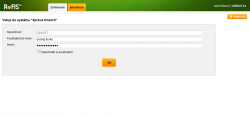
Logging in to the ReFIS application is done through a web browser. Enter the correct URL and fill in your credentials:
- user name
- password
ReFIS can be configured so that:
- the login credentials are the same as for logging in to Windows (or to any LDAP server). This login option is optional and can be switched off — even by the user themselves — making the ReFIS login independent of the Windows login.
For the initial setup, contact your network administrator, who will put this configuration in place. - ReFIS login is not used at all and authentication goes through a Microsoft account (including import) or a Google account
If a user has access to several companies (databases) within a single ReFIS installation and the same e-mail address and password in all of them, they can simply switch between the databases in the top right corner of the screen. If you use the "Log in as user" operation, switching to other databases is not available — otherwise ReFIS would let anyone holding the "Log in as user" right reach any linked database by switching step by step.